
OpenShell Guide
'%3e%3cpath%20d='M50%209%20L84%2023%20V51%20C84%2072%2069%2086%2050%2092%20C31%2086%2016%2072%2016%2051%20V23%20Z'%20fill='%2376B900'/%3e%3cg%20fill='none'%20stroke='%23FFFFFF'%20stroke-width='6'%20stroke-linecap='round'%20stroke-linejoin='round'%3e%3cpath%20d='M37%2041%20L49%2050%20L37%2059'/%3e%3cpath%20d='M55%2059%20H67'/%3e%3c/g%3e%3c/g%3e%3c/svg%3e) OpenShell Guide
OpenShell GuideOpenShell: a practical guide for enterprise AI agents
Learn what NVIDIA OpenShell is, how its runtime controls work, and how to deploy agents in your software delivery stack with defined access boundaries.
Updated October 6, 2026 · OpenShell documentation reviewed: v0.1.2

What is NVIDIA OpenShell?
OpenShell is an open source runtime for AI agents. It gives teams controls over the files, processes, network destinations, and services an agent can access while it works. Developed by NVIDIA with community contributors, OpenShell is now a CNCF Sandbox project.
Sources: OpenShell overview, CNCF project page.
For software teams, it provides a foundation for running agents against real repositories, development tools, and internal systems with defined access boundaries.
This guide explains how OpenShell works, where it fits in an enterprise environment, and how to approach a first implementation.
HyperShell builds on OpenShell with platform capabilities, implementation help, and ongoing platform support.
- Define access
- Specify the files, tools, services, and credentials the workflow needs.
- Enforce boundaries
- Apply runtime policies to the agent’s execution environment and service access.
- Review the result
- Use tests, acceptance criteria, and human review to decide whether the work is ready.
On this page
Why OpenShell matters for software teams
An agent investigating a failing build may need to read source code, install dependencies, run tests, and call a model. A maintenance agent may also need to prepare a change and open a pull request.
Those tasks require access. The operational challenge is deciding how much access to grant, enforcing that decision, and understanding what happened during each run.
OpenShell addresses that challenge at the runtime layer. Teams define permissions through policies, and enforcement operates outside the agent’s reasoning process. The agent can choose how to approach its task while its interactions with the environment remain subject to those controls.
Source: NVIDIA runtime controls overview
A useful starting point is to define three things for every workflow:
- The task: What should the agent accomplish?
- The access: Which files, tools, services, and credentials does it need?
- The acceptance criteria: What evidence should a person review before accepting its work?
OpenShell provides runtime controls for the second question. Your workflow design, tests, and review process establish the first and third.
Where OpenShell fits in the agent stack
An enterprise agent deployment brings together several layers:
| Layer | Responsibility |
|---|---|
| Model | Generates responses and helps the agent reason about its task. |
| Agent and workflow | Select tools, manage task context, execute steps, and decide what to do next. |
| OpenShell runtime | Applies controls to the agent’s execution environment and access to external services. |
| Your engineering systems | Provide repositories, CI pipelines, test environments, identity, and application permissions. |
This separation helps teams evaluate each part on its own terms. A better model may improve the proposed change. A stronger test suite may improve validation. Runtime controls constrain the systems and data the agent can reach.
A complete deployment needs those layers to work together.
OpenShell architecture: how the runtime works
OpenShell separates the agent’s workload from the components responsible for managing and enforcing its access.
The following diagram shows the conceptual path for outbound network access:
Sandbox boundary
| Component | Role |
|---|---|
| Sandbox | Runs the agent and its tools within an isolated environment, with filesystem and process controls. |
| Supervisor | Operates outside the workload, checks outbound requests against policy, and supplies authorized provider credentials. |
| Gateway | Manages sandboxes, access, policies, settings, and provider attachments. |
Filesystem and process restrictions are enforced within the sandbox’s operating environment. Outbound network requests travel through the protected channel to the supervisor, which evaluates them before opening an approved connection.
Source: OpenShell architecture
OpenShell security policies define permitted access
OpenShell policies describe which paths the workload can read or change, which network destinations its programs can reach, and which requests they can make.
For a software maintenance workflow, that could mean access to a working directory, an approved package registry, a repository service, and a selected model endpoint.
Review the effective policy when checking what an agent can access. Attached providers can contribute network permissions in addition to the sandbox’s base policy.
Source: Sandbox policies
Network access also has different levels of precision. Allowing a connection to an API host does not, by itself, restrict the agent to reading from that API. Supported request inspection can apply more specific rules, such as permitted HTTP methods and paths.
Rules may record violations or block them, depending on their enforcement mode. Confirm that the mode matches the boundary you intend to apply.
Source: Network rules
OpenShell providers control credential use
For credentials managed through OpenShell providers, the workload receives placeholders. OpenShell resolves those placeholders outside the agent workload when the request satisfies the required network and credential-binding checks.
This lets an agent use an authorized service while the real credential remains outside its execution environment.
Source: Providers
That protection applies to credentials managed through the provider mechanism. Secrets placed directly in readable files or ordinary environment variables remain accessible according to the workload’s permissions.
Source: Manage sandboxes
Model access follows the same access-control approach
OpenShell supports access to hosted and self-hosted model endpoints through configured providers and policies.
The agent’s client configuration selects the endpoint and model it calls. OpenShell governs whether that workload can make the request and use the associated credentials. Attaching a provider does not automatically select or replace the model.
Source: Inference
For enterprise deployments, model choice and data flow should be considered together. Decide which repositories and datasets may be used with a hosted service, and which require an approved internal endpoint.
Policy verification helps evaluate changes
OpenShell also includes a policy prover. It can evaluate whether a policy stays within a defined access boundary and assess risks introduced by proposed network rules.
Its conclusions apply to the policy features represented by its verification model. It evaluates permissions; the correctness of an agent’s code change still depends on your tests and review process.
Source: Policy prover
Applying OpenShell across the software development lifecycle
OpenShell provides a runtime foundation for workflows that interact with development systems. The workflow logic determines the task, the tools involved, and the evidence required to accept the result.
Three useful areas to evaluate are:
Software QA and release validation
An agent workflow can be designed to investigate failed tests, reproduce reported bugs, collect diagnostic evidence, or select tests according to rules agreed for a particular codebase.
Start with a defined validation problem and retain the coverage and acceptance criteria your team depends on.
Software maintenance
Maintenance workflows can address dependency updates, recurring bugs, security patches, and changes across supported release branches.
Define the approved target version, the releases in scope, the required validation, and the people responsible for accepting the change.
Modernizing existing agent infrastructure
Teams already running agents can evaluate how OpenShell fits around their existing workloads, credentials, and operational controls.
Assess the runtime and workflow separately. Compatibility, integration changes, and the surrounding orchestration need to be evaluated for each workload.
These are implementation patterns. Their behavior depends on the workflows and integrations built for the environment.
OpenShell example: a controlled dependency update
- 01Define task
- 02Prepare update
- 03Run checks
- 04Prepare pull request
- 05Human review
Consider a team maintaining an application called payments-api. The team wants an agent to update one dependency to an approved version, run the existing validation, and prepare a pull request.
The following is an illustrative design for that workflow.
Define the task
Give the agent a specific assignment:
Update the named dependency to the approved version in the designated repository. Follow the project’s contribution instructions, run the required checks, and prepare a pull request explaining the change and its validation results.
Provide the repository, target version, test instructions, and any compatibility requirements as explicit inputs.
Define the access
Build an access plan for the complete implementation:
| Resource or action | Intended access | Where to apply the control |
|---|---|---|
| Repository working copy | Read the project and modify the designated working directory | Sandbox filesystem policy and workspace setup |
| Package registry | Retrieve dependencies from approved sources | OpenShell network policy |
| Model endpoint | Use the model service selected for this workflow | Provider attachment, profile, network policy, and client configuration |
| Repository service | Push a proposed change and create a pull request | Scoped repository credentials and appropriate network rules |
| Protected branches | Require the team’s review and acceptance process | Repository permissions and branch rules |
| Production systems | No access required for this task | Exclude production credentials and network permissions |
The repository’s authorization remains part of the design. OpenShell adds controls over how the agent accesses that service; the service still enforces the permissions attached to its credentials.
Source: NVIDIA runtime controls overview
Run the workflow
- Prepare the environment. Start from a known image containing the agent and the tools required by the project.
- Inspect the project. Read its contribution instructions, dependency configuration, and validation requirements.
- Prepare the update. Make the scoped change and record any compatibility work it requires.
- Run validation. Execute the agreed checks and collect their output.
- Prepare the pull request. Include the change, the results, and anything that still needs human attention.
If validation fails, the workflow should return the failure evidence. If the task needs additional access, route that request through the agreed review process.
Make the result reviewable
The pull request should help an engineer answer:
- Which dependency changed, and why was this version selected?
- Which files were modified?
- Which checks ran, and what were their results?
- Were there failed checks, skipped checks, or unresolved compatibility questions?
- Did the workflow need any additional permissions?
Illustrative pull-request review packet
- Change scope
- Named dependency, approved target version, and modified files.
- Validation evidence
- Checks run, their results, and links to logs.
- Open questions
- Failed or skipped checks and unresolved compatibility work.
- Access changes
- Additional permissions requested and their review status.
- Decision
- Engineer reviews the evidence before accepting the change.
Evaluate the pilot using engineering effort per accepted change, review and rework effort, and the quality of the evidence delivered.
This gives the team a repeatable way to assess whether the workflow is useful before expanding it to more repositories or maintenance tasks.
Planning an enterprise OpenShell deployment
A first deployment should make the operating model explicit. Start with one workflow and resolve the following decisions.
Inside the customer environment
Gateway
Policies and provider configuration
Policies
Define effective access boundaries
Sandbox
Agent, tools and workspace
Separate supervisor
Outside the workload · mediates outbound access
Logs
Requests and operational evidence
Internal model endpoint
Optional configured connection
Outside · optional configured connections
Hosted model endpoint
Hosted source / registry services
Repository permissions still govern repository actions. Internal or hosted services must match the configured endpoints and effective policies.
Choose the execution environment
OpenShell supports several execution options, including Docker, Podman, Kubernetes, and MicroVM runtimes. The appropriate choice depends on whether you are evaluating locally, operating a single-machine environment, or providing shared infrastructure.
Check the current support matrix for the host platform, runtime, kernel, and software requirements. Use a supported stable release for production work.
Source: Support matrix
Define the data and service boundaries
List the systems the agent will touch: source hosting, registries, issue tracking, model endpoints, test environments, and any internal APIs.
For each one, document the required operations and the credentials involved. Use that inventory to build the policies and provider configuration.
Keep the initial scope small enough that the team can explain every permission.
Establish the review process
Decide who can create workflows, approve additional access, and accept the resulting work.
Access approval and change acceptance serve different purposes. Permission to contact a repository service does not establish that a proposed change is ready to merge.
Define both processes before the first workflow becomes routine.
Plan for day-to-day operation
Assign ownership for images, policy updates, credential rotation, logs, failed runs, and upgrades.
Also decide how an engineer stops a run, diagnoses a blocked request, and resumes work after an approved configuration change.
These operational details determine whether the deployment remains usable as more people and workflows depend on it.
Test the boundaries as well as the task
A successful demonstration should show the intended workflow completing and the intended restrictions taking effect.
For the dependency-update example, verify that the agent can access its working directory and approved services, while attempts to reach an unapproved destination are rejected.
Review the behavior when a test fails, a provider is unavailable, or the workflow asks for more access.
The official Run Your First Agent guide explains the initial image, provider, policy, and sandbox setup. Use it alongside the documentation for the release you deploy.
What HyperShell adds
HyperShell combines a platform built on OpenShell with implementation help and ongoing platform support.
We help teams connect agents to their existing repositories, pipelines, test runners, and review processes, then build the first workflows around a defined operational goal.
Platform
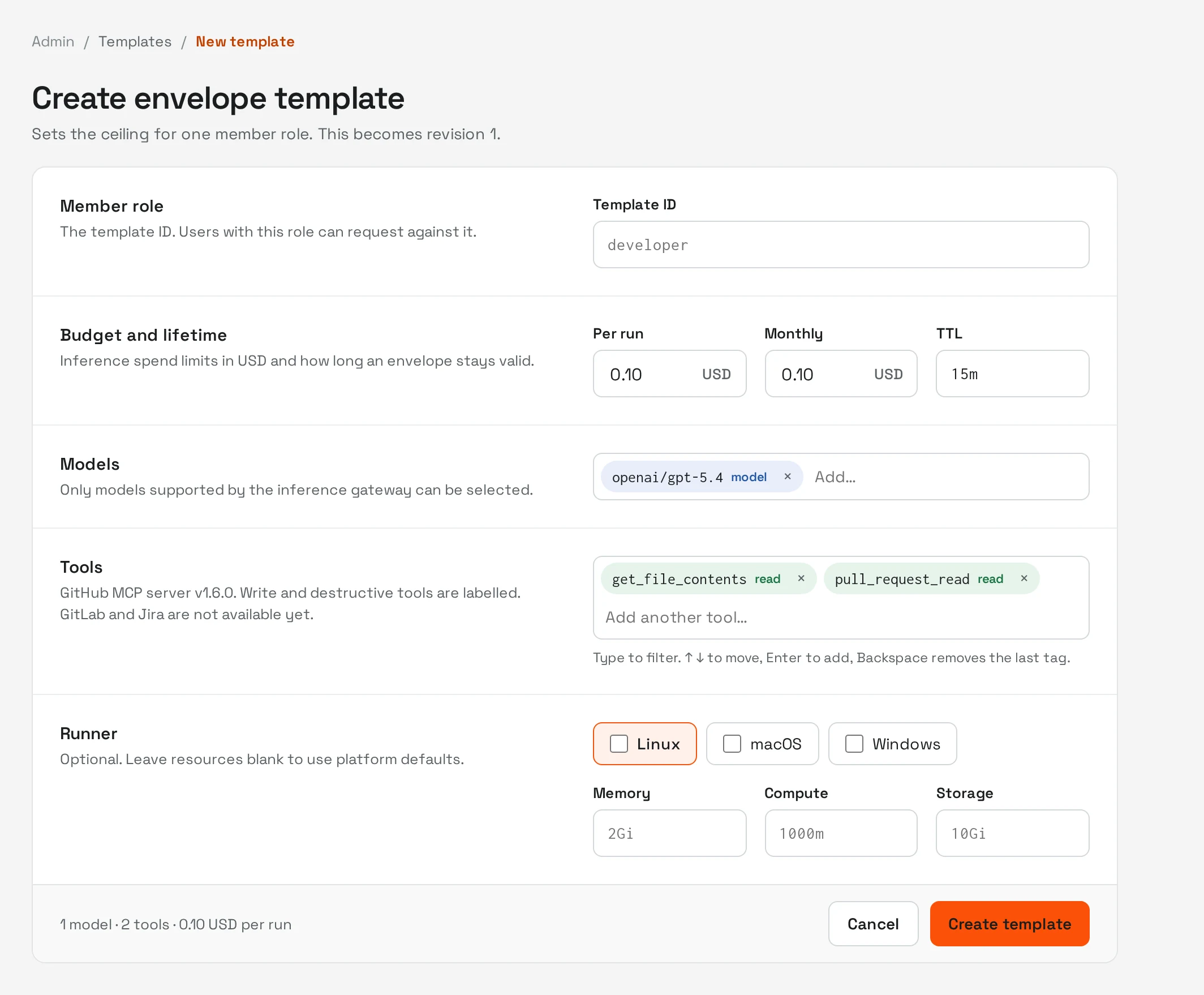
HyperShell provides a supported platform built on OpenShell, including Agent Envelopes: reusable, composable permission templates.
HyperShell’s Agent Envelopes define reusable limits for the models, tools, spending, and lifetime available to an agent.
Administrators establish the approved boundaries. Users request agents within those boundaries, while exceptions go through administrator review.
Agent Envelopes are a HyperShell platform capability built on the OpenShell runtime.
Implementation
HyperShell works with your team to scope a workflow, deploy the platform, connect the relevant systems, and build the initial agents.
The platform runs in your environment. Model inference can use a hosted service or a model deployed in your environment, according to the configuration you choose.
Support
HyperShell provides ongoing support for the underlying platform, including updates and bug fixes. Deployment and engagement scope are agreed around your environment and support needs.
Agents your team can extend
Your team owns and can modify the agents, skills, and context developed around its workflows.
After the initial implementation, your engineers can adapt those agents and create additional workflows as requirements change.
OpenShell’s upstream software and HyperShell’s platform capabilities and services are separate. HyperShell is not affiliated with NVIDIA.
OpenShell frequently asked questions
Is OpenShell open source?
Yes. OpenShell’s source code is available on GitHub under the Apache License 2.0. HyperShell’s platform capabilities and services are separate from the upstream project.
Source: OpenShell repository
Is OpenShell a CNCF project?
Yes. CNCF currently lists OpenShell at the Sandbox maturity level. See the official CNCF project page for its current status.
Can OpenShell work with existing coding agents?
OpenShell’s documentation describes workloads using agents such as Claude Code, Codex, OpenCode, and GitHub Copilot CLI. Your deployment still needs an appropriate workload image, required tools, provider access, and policies for the agent you choose.
Source: OpenShell overview
Does OpenShell require Kubernetes?
No. Kubernetes is one supported deployment option. Docker, Podman, and MicroVM runtimes are also available, subject to their documented platform requirements.
Source: Support matrix
Does the runtime require a GPU?
OpenShell supports CPU and GPU execution. A GPU is not required simply to provide the runtime controls. Hardware for serving a model locally is a separate deployment decision.
Source: NVIDIA runtime controls overview
Can we use a private or self-hosted model?
Yes. Configure the intended endpoint, provider profile, and access policy, then configure the agent’s client to use that model.
Keeping model inference inside your environment is one part of controlling data flow. The other services the workflow can reach also need to match your requirements.
Source: Inference
Does OpenShell make an agent’s output correct?
Runtime access controls constrain what the agent can access and do in its environment. Tests, acceptance criteria, and human review determine whether its proposed work meets your requirements.
For software delivery, design those checks into the workflow from the beginning.
Start with one useful workflow
Choose a recurring task, define the access it needs, and agree on what a successful result looks like.
For one team, that may be investigating failed tests. For another, it may be preparing dependency updates or bringing existing agents onto a supported runtime.
HyperShell can help you scope that first implementation and build an operating model your team can extend.
Discuss your OpenShell workflowExplore the HyperShell platform
Tell us the recurring task, the systems it touches, and the access it needs. We can help define a first implementation and the evidence your team will review.