
Built on OpenShell
OpenShell drives the agents. HyperShell supports your team.
HyperShell provides a supported platform built on OpenShell, with capabilities unique to HyperShell and expert implementation support for bringing governed AI agents into your existing software delivery workflows.
Connect agents to your repositories, pipelines, tests, and approvals. Run the platform in your environment, with your teams defining access and reviewing the work.
Already running agents on a homegrown harness or sandbox? Keep the agents and move the surrounding infrastructure onto a supported platform.
Agent platform modernization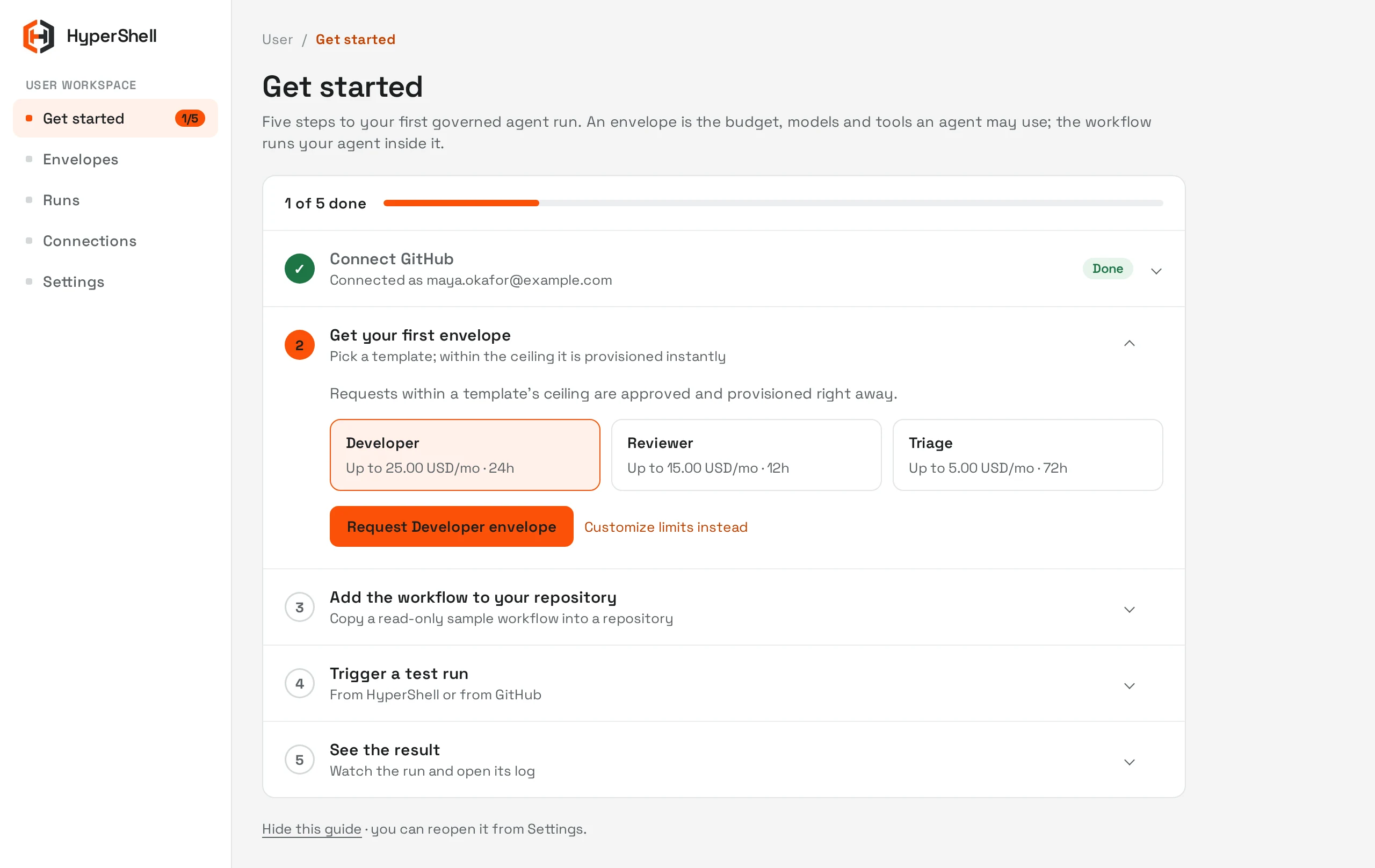
What OpenShell provides. What HyperShell adds.
OpenShell provides the runtime foundation. HyperShell builds on it with a supported platform and practical help deploying agents into the systems your teams already use.
OpenShell: the open-source runtime
NVIDIA OpenShell is an open-source runtime for sandboxed agents and enforceable access policies. It provides the runtime controls on which HyperShell builds. HyperShell is not affiliated with NVIDIA.
OpenShell documentation Explore the upstream OpenShell project Read the practical OpenShell GuideHyperShell: the supported platform
HyperShell combines OpenShell with capabilities unique to HyperShell and expert implementation support. We help teams connect agents to existing software delivery workflows and use the platform to manage access requests and inspect runs.
HyperShell builds on the OpenShell project. HyperShell’s own platform capabilities and services are separate from the upstream open-source software.
Agent Envelopes
Admins define the envelope. Users build agents inside it.
An Agent Envelope is a reusable, composable permission template: the models, tools, spend, and lifetime an agent may use. It is a HyperShell platform capability, enforced on the OpenShell runtime.
- 01
Admin sets the ceiling
An administrator publishes a template revision for a role, labeling tools as read, write, or destructive.
- 02
User requests within it
An engineer picks a template and narrows it for their agent. Requests inside the ceiling are provisioned without waiting for approval.
- 03
Exceptions are reviewed
Requests above the ceiling, or runs that hit a cumulative limit, go to one admin inbox with the difference shown.
The walkthrough below shows both sides: switch to For admins to see templates and the requests inbox.
Inside the HyperShell platform
Connect repositories, define access, and inspect agent runs.
HyperShell brings engineering and security teams into the same deployment process. Engineers connect their repositories and workflows. IT and security teams define the access boundaries. The walkthrough shows how teams request access, provision workflows, and inspect what happened during a run.
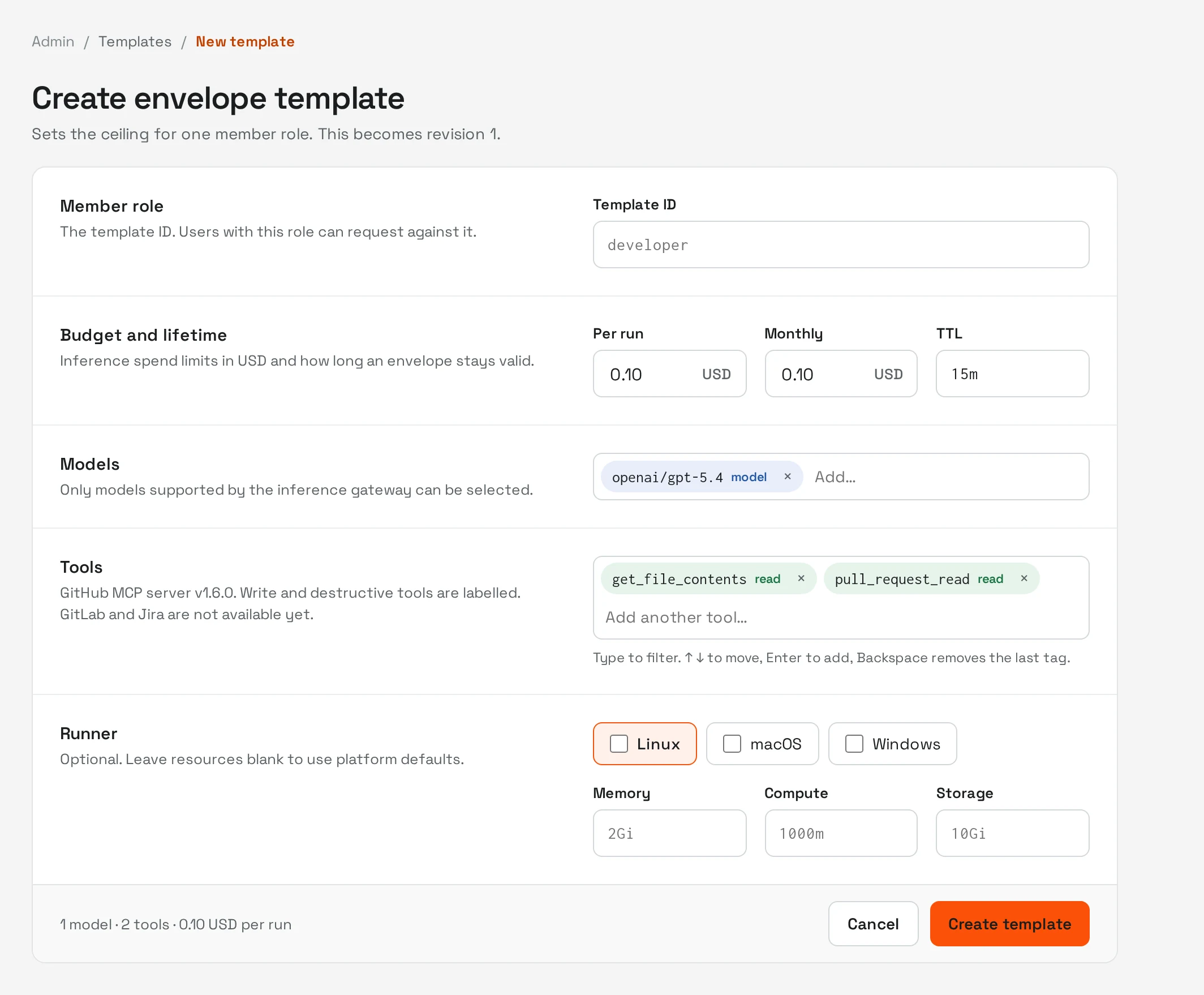
Admin journey · 01 / 04
Define the maximum authority for a role.
A template revision specifies supported models, GitHub tools, per-run and monthly spend, lifetime, and runner limits. Tool labels distinguish read, write, and destructive actions before a request is made.
What runs where
In your environment
- The OpenShell control plane and its policy configuration
- The agents, their tool calls, and their working state
- Source code, build artefacts, logs, and audit records
- The skills library and the context layer built around it
Outside it
- Model inference, where you choose a hosted model
- Nothing else by default
Where a hosted model is not acceptable for a given repository or dataset, the same skills run against a model deployed in your own environment.
Architecture brief
The reference architecture, on one page.
- Verified workload identity tied to each workflow and repository
- Isolated task execution with filesystem, process, and network policy
- Scoped model and tool access with recorded decisions
OpenShell deployment and support, built around your workflows.
Start with a defined workflow and a clear measure of success. HyperShell helps your team deploy the platform, connect the relevant systems, and put agents to work within your existing controls.
Choose the first workflow
Identify a repeatable development or testing task, the systems it touches, and the outcome your team will measure.
Deploy and connect
Put the platform in your environment and connect the repositories, tools, and access policies the workflow needs.
Review and expand
Inspect agent runs, keep engineers involved in review, and use the results to decide where to expand next.
Platform
Build and expand agents within approved Agent Envelopes on the HyperShell platform, built on OpenShell.
Implementation
Work with our forward-deployed engineers to build the first workflows in your environment, then modify agents and create new ones independently.
Support
Get ongoing support for the underlying platform, including updates and bug fixes.
Solutions built on the platform
Talk with us about your environment, required integrations, and support needs so we can define the deployment and engagement scope together.
Why it stays in your infrastructure
The value of an agent deployment accumulates in context rather than in the model: which systems it may reach, which conventions the codebase follows, which corrections your engineers made in review. Held inside a vendor product, that context is the thing you cannot take with you. Held in your own environment as code, it remains an asset you own and can move.
Plan your OpenShell deployment.
Tell us which software delivery workflow you want to improve, what systems it touches, and the controls your team needs. We’ll discuss how HyperShell can help you put OpenShell to work.